
isee4 product details
Product name: breo iSee 4
Charging time: Approximately 3 hours Package size: 22.6 x 13.6 x 12.6 cm
Model number: iSee4
Rated input: 5V⎓
Battery capacity: 1150mAh
Charging time: Approximately 3 hours Package size: 22.6 x 13.6 x 12.6 cm
Model number: iSee4
Rated input: 5V⎓
Battery capacity: 1150mAh
Package weight: 640g
Accessories: Charging cable/storage bag Material: fabric/ABS
Rated power: 5W
Color: Pure White/Champagne Gold
Accessories: Charging cable/storage bag Material: fabric/ABS
Rated power: 5W
Color: Pure White/Champagne Gold
 Relieves eye strain
 Improves dry eyes
  Reduce dark circles
 Improves relaxation and sleep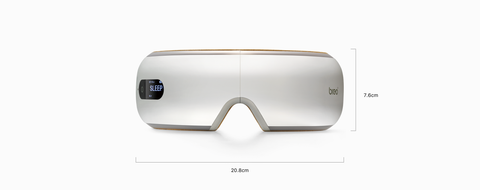
Free Shipping | 14-Day Returns | 12-Month Warranty
The optimized Breo iSee4 has been upgraded with optimized heating, a quieter motor, and a redesigned airbag for a precise, hot-pack experience. It features a software-updated microprocessor to deliver more precise technology with refined air pressure, improved acupressure targeting, and faster heat compression. It gently heats your eyes for a relaxing effect and relieves fatigue. The new iSee4 is ideal for relieving dry and tired eyes, natural headache relief, and everyday relaxation.
How to use
1. In the shutdown state, press and hold the ON/OFF button until the device emits a "DI" sound and starts working.
2. Plug the power cord into a wall outlet. We recommend using a surge protection power bar and connecting the other end to the DC jack under the rear cover.
3. The light will flash while charging and will remain lit when the product is fully charged.
4. This product cannot be used while charging. Once charging is complete, unplug the power adapter before use. (If the product is running while charging, the product's self-protection program will be activated and it will automatically shut down.)
5. Charging time: 2-3 hours
6. Mode selection
The default mode after powering on is circulation mode, short press the mode button to switch between medium, hard and circulation modes.
Circulation mode Medium mode Hard mode
Time: 10 minutes Time: 15 minutes Time: 15 minutes
Air pressure: ON Air pressure: ON Air pressure: ON
Heating function: ON Heating function: ON Heating function: ON
Vibration: OFF Vibration: OFF Vibration: ON
Music: OFF Music: ON Music: ON
7. How to manually turn off the power
Press and hold the power on/off button for more than 2 seconds. A long "DI" tone will sound and the power will automatically shut down.
2. Plug the power cord into a wall outlet. We recommend using a surge protection power bar and connecting the other end to the DC jack under the rear cover.
3. The light will flash while charging and will remain lit when the product is fully charged.
4. This product cannot be used while charging. Once charging is complete, unplug the power adapter before use. (If the product is running while charging, the product's self-protection program will be activated and it will automatically shut down.)
5. Charging time: 2-3 hours
6. Mode selection
The default mode after powering on is circulation mode, short press the mode button to switch between medium, hard and circulation modes.
Circulation mode Medium mode Hard mode
Time: 10 minutes Time: 15 minutes Time: 15 minutes
Air pressure: ON Air pressure: ON Air pressure: ON
Heating function: ON Heating function: ON Heating function: ON
Vibration: OFF Vibration: OFF Vibration: ON
Music: OFF Music: ON Music: ON
7. How to manually turn off the power
Press and hold the power on/off button for more than 2 seconds. A long "DI" tone will sound and the power will automatically shut down.
